# Mybatis源码解析:MyBatis用法一览

# Mybatis的前世今生
mybatis是在ibatis的基础上升级来的,因此mybatis的发展阶段主要可以分为2个阶段。
我们先来演示一下ibatis阶段的用法
mybatis-config.xml
<!DOCTYPE configuration
  PUBLIC "-//mybatis.org//DTD Config 3.0//EN"
  "http://mybatis.org/dtd/mybatis-3-config.dtd">

<configuration>

  <settings>
    <setting name="logImpl" value="STDOUT_LOGGING"/>
  </settings>

  <!-- autoMappingBehavior should be set in each test case -->

  <environments default="development">
    <environment id="development">
      <transactionManager type="JDBC">
        <property name="" value=""/>
      </transactionManager>
      <dataSource type="POOLED">
        <property name="driver" value="com.mysql.jdbc.Driver"/>
        <property name="url" value="jdbc:mysql://myhost:3306/test"/>
        <property name="username" value="test"/>
        <property name="password" value="test"/>
      </dataSource>
    </environment>
  </environments>

  <mappers>
    <mapper resource="org/apache/ibatis/mytest/UserInfoMapper.xml"/>
  </mappers>

</configuration>
UserInfoMapper.xml
<?xml version="1.0" encoding="UTF-8"?>
<!DOCTYPE mapper
    PUBLIC "-//mybatis.org//DTD Mapper 3.0//EN"
    "http://mybatis.org/dtd/mybatis-3-mapper.dtd">

<mapper namespace="org.apache.ibatis.mytest.UserInfoMapper">

  <select id="selectById" resultType="org.apache.ibatis.mytest.UserInfo">
    select * from user_info WHERE id = #{id}
  </select>
</mapper>
ibatis阶段的用法
 用这种方式来执行sql会有很多问题
- 调用的方法有可能写错,实际要执行的sql并没有配置
- 传入的参数有可能写错,因为入参是Object类型
- 返回值有可能写错,因为返回值也是Object类型
为了解决上面的问题,mybatis在ibatis的基础上增加了动态代理的过程。首先需要定义一个mapper接口,然后基于sqlsession获取动态代理类,然后执行相应的方法即可
public interface UserInfoMapper {
  UserInfo selectById(int id);
}
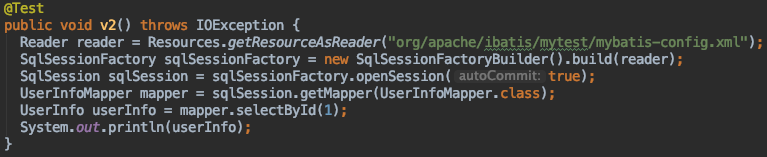 用mapper接口的方式来调用方便多了哈,这也是我们最常用的使用方式
# 常用配置
MyBatis配置XML文件的层次结构,标签顺序要正确,否则会报错
<?xml version="1.0" encoding="UTF-8"?>
<!DOCTYPE configuration
PUBLIC "-//mybatis.org//DTD Config 3.0//EN"
"http://mybatis.org/dtd/mybatis-3-config.dtd">
<configuration><!--配置-->
	<properties/><!--属性-->
	<settings><!--设置-->
		<setting name="" value=""/>
	</settings>
	<typeAliases/><!--类型命名-->
	<typeHandlers/><!--类型处理器-->
	<environments default=""><!--配置环境-->
		<environment id="">
			<transactionManager type=""/><!--事务管理器-->
			<dataSource type=""/><!--数据源-->
		</environment>
	</environments>
	<databaseIdProvider type=""/><!--数据库厂商标识-->
	<mappers/><!--mapper文件-->
</configuration>
在mybatis中所有的配置都会放到Configuration这个类中,并且常用的组件都是由Configuration来创建的,这就让mybatis源码的逻辑看起来非常清晰易懂
官网对这些配置的解释很详细,我就分享几个我常用的配置把 https://mybatis.org/mybatis-3/zh/configuration.html
# 别名
MyBatis定义了一些系统经常使用的类型的别名,例如,数值,字符串等
| 别名 | 映射的类型 | 支持数组 |
|---|---|---|
| _byte | byte | 是 |
| string | String | 否 |
| list | List | 否 |
| int | Integer | 是 |
另外我们可以通过如下2种方式自定义别名
<typeAliases>
	<typeAlias alias="role" type="com.javashitang.part1.po.Role"/>
</typeAliases>
通过自动扫描包自定义别名,将类名的第一个字母变成小写,作为MyBatis的别名
<typeAliases>
	<package name="com.javashitang.part1.po"/>
</typeAliases>
在定义了自动扫描包之后,如果想更改别名,可以使用注解
@Alias("roleTest")
public class Role
将Role的别名定义为roleTest,这样可以在resultType,parameterType中直接使用别名,而不用全类名
# 引入mapper文件
引入mapper文件常见的方式有如下三种
文件路径引入
<mappers>
	<mapper resource="com/javashitang/part1/mapper/RoleMapper.xml"/>
</mappers>
类名名引入
<mappers>
	<package name="com.javashitang.part1.mapper"/>
</mappers>
类名引入
<mappers>
	<mapper class="com.javashitang.part1.mapper.RoleMapper"/>
</mappers>
# 动态SQL标签
| 标签 | 作用 |
|---|---|
| if | 单条件分支判断 |
| choose, when, otherwise | 多条件分支判断 |
| trim, where, set | 处理sql拼装 |
| foreach | 用户in查询 |
if元素
<select id="findRoles" parameterType="string" resultMap="roleResultMap">
    select id, role_name, note from role
    <if test="roleName != null and roleName != ''">
        where role_name like concat('%',#{roleName},'%')
    </if>
</select>
findRoles函数传入的参数为空字符串时返回所有的数据,否则返回符合条件的数据
# choose,when,otherwise元素
当角色编号不为空,则只用角色编号作为条件查询 当角色编号为空,而角色名称不为空,则用角色名称作为条件进行模糊查询 当角色编号和角色名称都为空,则要求角色备注不为空
<select id="findRoles2" parameterType="string" resultMap="roleResultMap">
    select id, role_name, note from role where 1 = 1
    <choose>
        <when test="id != null and id != ''">
            and id = #{id}
        </when>
        <when test="roleName != null and roleName != ''">
            and role_name like concat('%',#{roleName},'%')
        </when>
        <otherwise>
            and note not null
        </otherwise>
    </choose>
</select>
# trim,where,set元素
where标签可以给语句添加where语句,如果语句开头有and或者or,则会剔除
<select id="findRoleByIdAndName" resultType="com.javashitang.part1.pojo.Role">
    select id, role_name, note
    from role
    <where>
        <if test="id != null">
            id = #{id}
        </if>
        <if test="roleName != null and roleName != ''">
            and role_name = #{roleName}
        </if>
    </where>
</select>
MyBatis在生成update语句时若使用if标签,如果前面的if没有执行,则可能导致有多余逗号的错误,使用set标签可以将动态的配置SET 关键字,和剔除追加到条件末尾的任何不相关的逗号。
<update id="updateRole" parameterType="roleTest">
    update role
    <set>
        <if test="roleName != null and roleName != ''">
            role_name = #{roleName},
        </if>
        <if test="note != null and note != ''">
            note = #{note}
        </if>
    </set>
    where id = #{id}
</update>
trim标签的用法如下
| 属性 | 用法 |
|---|---|
| prefix | 当trim元素包含内容时,会给内容增加prefix指定的前缀 |
| prefixOverride | 当trim元素包含内容时,会把内容中匹配的前缀字符串去掉 |
| suffix | 当trim元素包含内容时,会给内容增加suffix指定的后缀 |
| suffixOverride | 当trim元素包含内容时,会把内容中匹配的后缀字符串去掉 |
where和set标签就是用trim标签实现的,如下写法是等价的
<where>
<trim prefix="WHERE" prefixOverride="AND | OR">

<set>
<trim prefix="SET" suffixOverrides=",">
# foreach元素
| 属性 | 作用 |
|---|---|
| collection | 传递进来的集合 |
| item | 循环中当前的元素 |
| index | 当前元素的下标 |
| open close | 以什么符号将这些集合元素包装起来 |
| separator | 各个元素的间隔符 |
<select id="findRoles3" resultType="roleTest">
    select * from role where id IN
    <foreach collection="idList" item="role" index="index" open="(" separator="," close=")">
        #{role}
    </foreach>
</select>
← JDBC用法一览 聊聊那些实用的工具类 →