# RocketMQ源码解析:延时消息是如何实现的?

# 使用场景
当我们在电商平台购买一件物品,但是没有付款时,平台会把对应的库存减少,并在会在30分钟后关闭这个订单。如果30分钟内你没有付款,平台会自动关闭这个订单,此时对应的库存被释放出来。
我们怎么在订单创建30分钟后并且没有付款的情况下将这个订单关闭掉? 不断的扫描数据库吗?扫库的时间间隔怎么确定?间隔太长,关闭订单的时间点不精确,间隔太短,数据库的压力又太大?
此时我们就可以用到延时消息,订单没有支付发一个延时时间为30m的延时消息,30m过后系统就会收到这个消息,进而关闭订单
RocketMQ支持18个级别的延时,每个级别的延时时间如下。注意RocketMQ不支持任意精度的延时消息,支持特定级别的延时,如1s,5m,1h等
// MessageStoreConfig.java
private String messageDelayLevel = "1s 5s 10s 30s 1m 2m 3m 4m 5m 6m 7m 8m 9m 10m 20m 30m 1h 2h";
public class DelayMessageProducer {

    public static final String PRODUCER_GROUP_NAME = "delayProducerGroup";
    public static final String TOPIC_NAME = "delayTopic";
    public static final String TAG_NAME = "delayTag";

    public static void main(String[] args) throws Exception {
        DefaultMQProducer producer = new DefaultMQProducer(PRODUCER_GROUP_NAME);
        producer.setNamesrvAddr("myhost:9876");
        producer.start();

        for (int i = 0; i < 3; i++) {
            Message message = new Message(TOPIC_NAME, TAG_NAME, ("hello rocketmq " + i).getBytes(RemotingHelper.DEFAULT_CHARSET));
            // 设置消息延迟级别为2,延时5s左右
            message.setDelayTimeLevel(2);
            SendResult sendResult = producer.send(message);
            System.out.println(sendResult);
        }

        producer.shutdown();
    }
}
public class DelayMessageConsumer {

    public static final String CONSUMER_GROUP_NAME = "delayConsumerGroup";

    public static void main(String[] args) throws Exception {
        DefaultMQPushConsumer consumer = new DefaultMQPushConsumer(CONSUMER_GROUP_NAME);
        consumer.setNamesrvAddr("myhost:9876");
        consumer.subscribe(DelayMessageProducer.TOPIC_NAME, "*");
        consumer.registerMessageListener(new MessageListenerConcurrently() {
            @Override
            public ConsumeConcurrentlyStatus consumeMessage(List<MessageExt> list, ConsumeConcurrentlyContext consumeConcurrentlyContext) {
                for (MessageExt message : list) {
                    System.out.printf("%s receive new message %s%n", Thread.currentThread().getName(), message);
                    System.out.printf("delay time is %s%n", System.currentTimeMillis() - message.getStoreTimestamp());
                }
                return ConsumeConcurrentlyStatus.CONSUME_SUCCESS;
            }
        });
        consumer.start();
        System.out.println("Consumer Started");
    }
}
# 实现原理
上一节说过,RocketMQ的消息重试是通过往重试队列发送定时消息来实现的。消息重试只是把定时消息的前2个级别去掉,每次发送下一个级别的延时消息
| 第几次重试 | 与上次重试的间隔时间 | 第几次重试 | 与上次重试的间隔时间 |
|---|---|---|---|
| 1 | 10 秒 | 9 | 7 分钟 |
| 2 | 30 秒 | 10 | 8 分钟 |
| 3 | 1 分钟 | 11 | 9 分钟 |
| 4 | 2 分钟 | 12 | 10 分钟 |
| 5 | 3 分钟 | 13 | 20 分钟 |
| 6 | 4 分钟 | 14 | 30 分钟 |
| 7 | 5 分钟 | 15 | 1 小时 |
| 8 | 6 分钟 | 16 | 2 小时 |
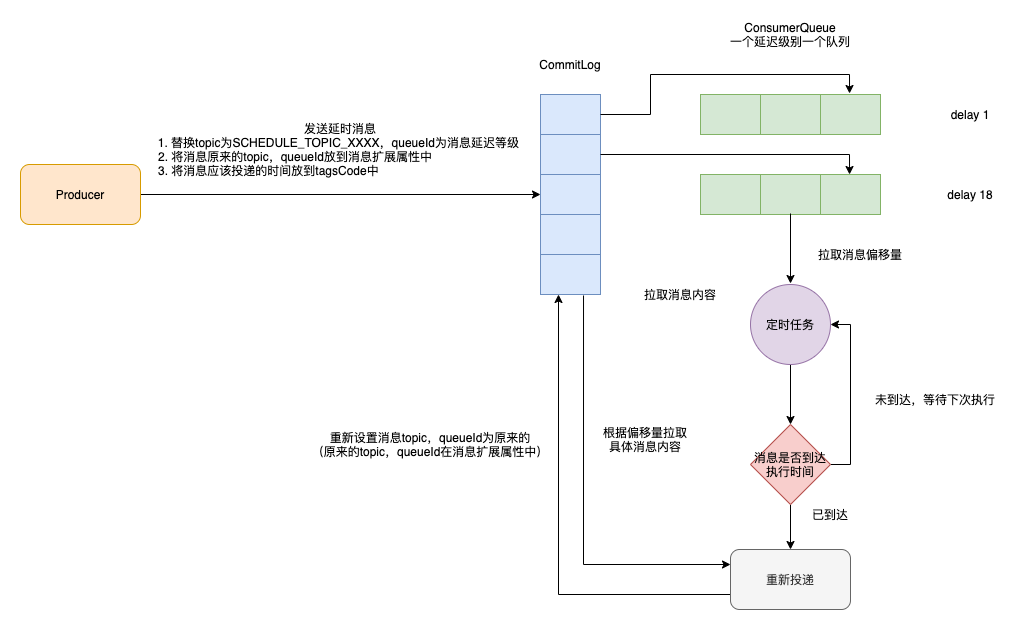 如图所示演示一波延时消息的实现逻辑
- 发送延时消息 1.1 替换topic为SCHEDULE_TOPIC_XXXX,queueId为消息延迟等级(如果不替换topic直接发到对应的consumeQueue中,则消息会被立马消费) 1.2 将消息原来的topic,queueId放到消息扩展属性中 1.3 将消息应该执行的时间放到tagsCode中
- 将消息顺序写到CommitLog中
- 将消息对应的信息分发到对应的ConsumerQueue中(topic为SCHEDULE_TOPIC_XXXX总共有18个queue,对应18个延迟级别)
- 定时任务不断判断消息是否到达投递时间,没有到达则后续执行投递
- 如果到达投递时间,则从commitLog中拉取消息的内容,重新设置消息topic,queueId为原来的(原来的topic,queueId在消息扩展属性中),然后将消息投递到commitLog中,此时消息就会被分发到对应的队列中,然后被消费
# 源码解析
# Broker端存储延时消息
CommitLog#asyncPutMessage方法为CommitLog存储消息的过程,在存储的过程中对延时消息做了特殊的处理
if (tranType == MessageSysFlag.TRANSACTION_NOT_TYPE
        || tranType == MessageSysFlag.TRANSACTION_COMMIT_TYPE) {
    // Delay Delivery
    // 延时消息
    if (msg.getDelayTimeLevel() > 0) {
        // 超过最大延时级别
        if (msg.getDelayTimeLevel() > this.defaultMessageStore.getScheduleMessageService().getMaxDelayLevel()) {
            msg.setDelayTimeLevel(this.defaultMessageStore.getScheduleMessageService().getMaxDelayLevel());
        }

        // 更换topic为SCHEDULE_TOPIC_XXXX
        topic = TopicValidator.RMQ_SYS_SCHEDULE_TOPIC;
        // 队列id=延时级别-1
        queueId = ScheduleMessageService.delayLevel2QueueId(msg.getDelayTimeLevel());

        // Backup real topic, queueId
        // 备份真实的主题和队列id
        MessageAccessor.putProperty(msg, MessageConst.PROPERTY_REAL_TOPIC, msg.getTopic());
        MessageAccessor.putProperty(msg, MessageConst.PROPERTY_REAL_QUEUE_ID, String.valueOf(msg.getQueueId()));
        msg.setPropertiesString(MessageDecoder.messageProperties2String(msg.getProperties()));

        msg.setTopic(topic);
        msg.setQueueId(queueId);
    }
}
- 发送延时消息 1.1 替换topic为SCHEDULE_TOPIC_XXXX,queueId为消息延迟等级(如果不替换topic直接发到对应的consumeQueue中,则消息会被立马消费) 1.2 将消息原来的topic,queueId放到消息扩展属性中 1.3 将消息应该执行的时间放到tagsCode中
- 将消息顺序写到CommitLog中
- 将消息对应的信息分发到对应的ConsumerQueue中(topic为SCHEDULE_TOPIC_XXXX总共有18个queue,对应18个延迟级别)
另外每隔1ms,DefaultMessageStore将commitLog中的消息分发到consumerQueue和IndexFile
public class DefaultMessageStore implements MessageStore {

    @Override
    public void run() {
        DefaultMessageStore.log.info(this.getServiceName() + " service started");

        while (!this.isStopped()) {
            try {
                Thread.sleep(1);
                this.doReput();
            } catch (Exception e) {
                DefaultMessageStore.log.warn(this.getServiceName() + " service has exception. ", e);
            }
        }

        DefaultMessageStore.log.info(this.getServiceName() + " service end");
    }
}
在分发的过程中如果这个消息是延时消息,则会将消息的tagsCode设置为消息应该被投递的时间
// CommitLog#checkMessageAndReturnSize
// Timing message processing
{
    String t = propertiesMap.get(MessageConst.PROPERTY_DELAY_TIME_LEVEL);
    if (TopicValidator.RMQ_SYS_SCHEDULE_TOPIC.equals(topic) && t != null) {
        int delayLevel = Integer.parseInt(t);

        if (delayLevel > this.defaultMessageStore.getScheduleMessageService().getMaxDelayLevel()) {
            delayLevel = this.defaultMessageStore.getScheduleMessageService().getMaxDelayLevel();
        }

        if (delayLevel > 0) {
            // 将消息的tagsCode设置为消息应该被投递的时间
            tagsCode = this.defaultMessageStore.getScheduleMessageService().computeDeliverTimestamp(delayLevel,
                storeTimestamp);
        }
    }
}
# 使用定时器重新投递消息
ScheduleMessageService则会不断轮询定时队列中的消息,如果到达投递时间,则将消息重新投递到commitLog
在Broker启动的时候,会将延迟等级和其对应的延迟时间存放在delayLevelTable中
// 延时级别 -> 延时时间
private final ConcurrentMap<Integer /* level */, Long/* delay timeMillis */> delayLevelTable =
    new ConcurrentHashMap<Integer, Long>(32);
给每一个延迟级别的消息创建一个定时器,不断找出需要投递的消息
public void start() {
    if (started.compareAndSet(false, true)) {
        super.load();
        this.timer = new Timer("ScheduleMessageTimerThread", true);
        // 为每个级别创建一个定时器,1s后执行
        for (Map.Entry<Integer, Long> entry : this.delayLevelTable.entrySet()) {
            Integer level = entry.getKey();
            Long timeDelay = entry.getValue();
            Long offset = this.offsetTable.get(level);
            if (null == offset) {
                offset = 0L;
            }

            if (timeDelay != null) {
                this.timer.schedule(new DeliverDelayedMessageTimerTask(level, offset), FIRST_DELAY_TIME);
            }
        }

        // 省略部分代码
    }
}
具体判断的逻辑在DeliverDelayedMessageTimerTask中,不断从延时消息的ConsumeQueue中取出消息,将消息的投递时间(消息的投递时间已经存在tagsCode中了哈)和当前时间进行比较,如果已经到达,将消息恢复为原来的topic和queueId,投递到commitLog,此时Consumer端就能消费延迟消息了,否则等一会再判断是否已经到达
class DeliverDelayedMessageTimerTask extends TimerTask {

    @Override
    public void run() {
        try {
            if (isStarted()) {
                this.executeOnTimeup();
            }
        } catch (Exception e) {
        }
    }

    public void executeOnTimeup() {
        // 不断判断消息是否已经达到投递时间
        // 如果已经到达将消息恢复为原来的topic和queueId,投递到commitLog

    }

}